

Azure Arc Private Link Lab: Zero Public IP Setup (Terraform)
2025-11-26 · ~9 min read · Updated 2026-02-14
Complete Azure Arc lab with Private Link — zero public IPs. Terraform code, DNS zones, and the networking gotchas Microsoft's quickstart skips. Deploy in 15 minutes.
Every Azure Arc demo I've seen shows agents connecting over the public internet. Microsoft's documentation walks you through the "happy path" - click here, install there, boom, your on-premises servers appear in Azure Portal.
This guide is part of our Azure Governance hub covering policy enforcement, compliance frameworks, and enterprise controls.
But here's the problem: That's not how enterprise infrastructure works.
Your datacenter servers don't have public IPs. Your security team won't approve internet-exposed management traffic. Your compliance framework requires private connectivity. And when you ask Microsoft how to demo Arc in a realistic way, the documentation gets... quiet.
So I built it myself. Here's how to create a complete Azure Arc lab environment that actually reflects enterprise security requirements - with zero public IP exposure and all traffic over Azure Private Link.
And yes, the complete Terraform code is on GitHub. Because if I had to figure this out, you shouldn't have to.
The Reality Gap
Microsoft's Arc demos work great in their labs. They have public IPs, wide-open internet access, and security teams that don't ask questions.
Your environment has:
- 21 Active Directory domains (yes, really)
- DMZ networks with strict firewall rules
- Servers that have never seen the public internet
- A CISO who will shut down any "just open port 443 outbound" proposals
- Compliance frameworks that require private connectivity
The gap between Microsoft's demos and enterprise reality is massive. This post bridges that gap.
What We're Building
A complete Arc lab environment deployed in Azure that simulates on-premises infrastructure:
- 3 Windows Server VMs acting as "datacenter servers"
- Azure Private Link for all Arc connectivity (zero internet)
- Private DNS zones for Arc endpoint resolution
- Azure Bastion for admin access (the only public IP)
- Complete network isolation with proper subnet segmentation
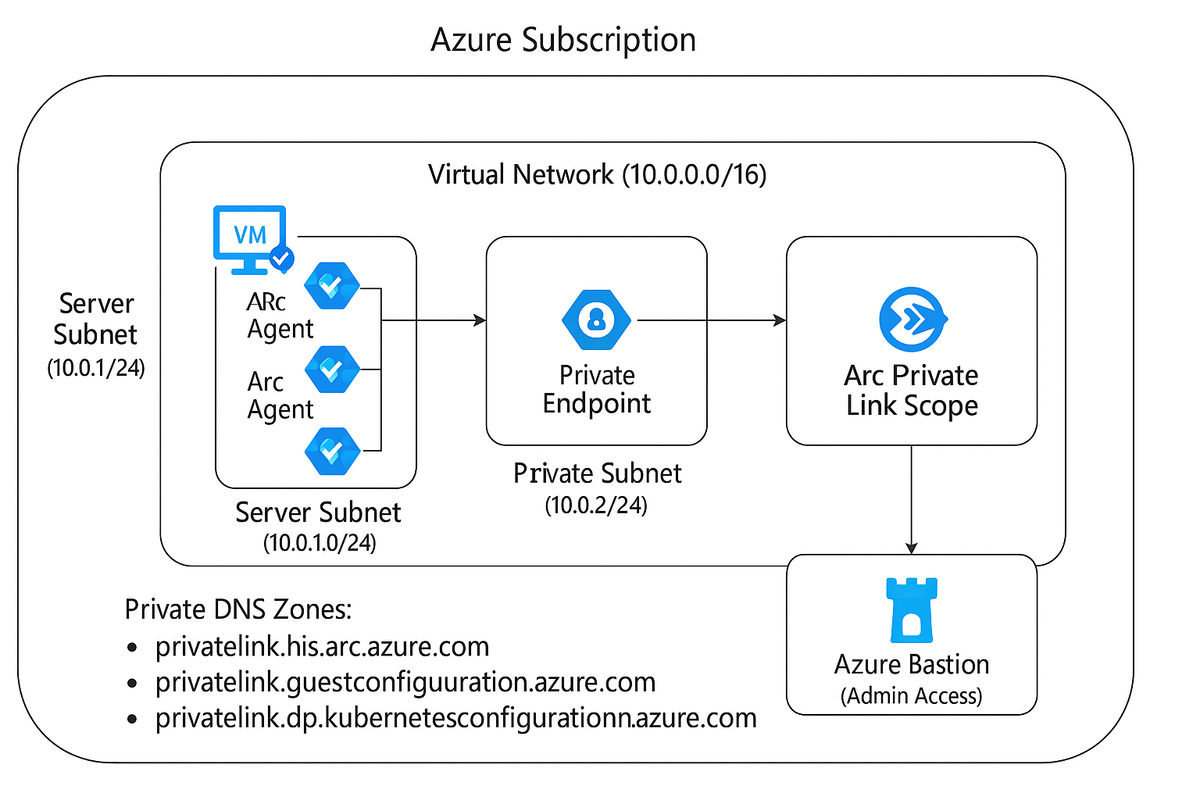
The architecture looks like this:
What this demonstrates:
- How Arc actually works in regulated environments
- Private Link configuration for hybrid management
- DNS resolution without public endpoints
- Security team-approved architecture
- Realistic demo environment for POCs
Why This Matters
When you're managing infrastructure across 40+ Azure subscriptions with over 30,000 resources, complexity is inevitable. Add a corporate merger bringing multiple datacenters, thousands of servers, and strict regulatory requirements, and the challenge multiplies.
Azure Arc is perfect for this scenario. But only if it works within your security constraints.
Every Arc demo I found assumed:
1. Servers can reach the public internet
2. DNS resolves to public endpoints
3. Firewall rules allow outbound HTTPS
4. Security teams are flexible
In reality:
1. Servers are network-isolated
2. DNS must use private zones
3. Firewalls block everything by default
4. Security teams say "prove it's secure first"
So I built the proof.
The Architecture (Deep Dive)
Network Design
Virtual Network (10.0.0.0/16) with three subnets:
- Server Subnet (10.0.1.0/24) - Where our "on-premises" VMs live
- Private Link Subnet (10.0.2.0/24) - Arc private endpoints
- Bastion Subnet (10.0.3.0/26) - Admin access (required /26 minimum)
Why this design? Security boundaries. Each subnet serves a distinct purpose:
- Servers can't reach the internet
- Private endpoints isolate Arc traffic
- Bastion provides controlled admin access
Private Link Configuration
This is the critical piece. Azure Arc Private Link Scope acts as the bridge between your servers and Azure:
Arc Agent → Private Endpoint → Private Link Scope → Azure Control Plane
Three Private DNS zones handle resolution:
- privatelink.his.arc.azure.com
- privatelink.guestconfiguration.azure.com
- privatelink.dp.kubernetesconfiguration.azure.com
When the Arc agent tries to reach his.arc.azure.com, private DNS resolves it to the private endpoint IP (10.0.2.x). No public internet involved.
The Arc Agent Flow
- Agent installation - Standard MSI on Windows Server
- Connection attempt - Agent tries to reach Arc endpoints
- DNS resolution - Private DNS returns private IPs
- Private Link - Traffic routes through private endpoint
- Arc registration - Server appears in Azure Portal
All traffic stays on the Azure backbone. Zero internet exposure.
Deployment (15 Minutes)
The complete Terraform code is here: azure-arc-private-lab
Prerequisites:
- Azure subscription (Owner or Contributor)
- Terraform 1.6+
- Azure CLI 2.50+
- Service Principal for Arc onboarding
Quick start:
# Clone the repo
git clone https://github.com/dswann101164/azure-arc-private-lab.git
cd azure-arc-private-lab/terraform

# Configure
cp terraform.tfvars.example terraform.tfvars
# Edit with your values

# Set secrets
export TF_VAR_admin_password="YourPassword123!"
export TF_VAR_arc_service_principal_id="your-sp-id"
export TF_VAR_arc_service_principal_secret="your-sp-secret"

# Deploy
terraform init
terraform plan
terraform apply
What gets created:
- Resource group with all components
- Virtual network with proper segmentation
- Azure Bastion for secure access
- Arc Private Link Scope
- 3 Private DNS zones with proper records
- 3 Windows Server 2022 VMs
- Arc agent installed and connected
Deployment time: ~15 minutes
Real-World Testing
After deployment, connect to a VM via Bastion and verify:
# Check Arc agent status
azcmagent show

# Output shows:
Agent Status: Connected
Connection Type: Private
Private Link Scope: /subscriptions/.../pls-arc-lab-xxxxx
That "Connection Type: Private" line? That's what your security team wants to see.
Now test hybrid management:
# Apply Azure Policy to Arc servers
az policy assignment create \
  --name "require-tags" \
  --scope "/subscriptions/YOUR_SUB_ID" \
  --policy "require-tag-and-value"

# Query across all infrastructure
az graph query -q "
  Resources
  | where type in~ ('microsoft.compute/virtualmachines',
                    'microsoft.hybridcompute/machines')
  | project name, type, location
"
Your Arc-enabled servers appear alongside native Azure VMs. Single pane of glass for hybrid infrastructure.
Cost Reality
Running 24/7:
- Azure Bastion (Standard): ~$140/month
- 3 Private Endpoints: ~$21/month
- 3 VMs (D2s_v3): ~$210/month
- Storage/Network: ~$25/month
- Total: ~$396/month
Lab mode (VMs stopped when not demoing):
- Azure Bastion (Developer SKU): ~$25/month
- Private Endpoints: ~$21/month
- VMs (stopped): ~$10/month
- Storage/Network: ~$10/month
- Total: ~$66/month
Stop VMs between demos:
az vm deallocate --ids $(az vm list -g rg-arc-private-lab --query "[].id" -o tsv)
Start for demos:
az vm start --ids $(az vm list -g rg-arc-private-lab --query "[].id" -o tsv)
What I Learned
1. Private Link is not optional for enterprise Arc
Every serious Arc deployment I've seen uses Private Link. The public internet path is fine for demos, but production deployments require private connectivity.
2. DNS is critical (and easy to get wrong)
Private DNS zones must be linked to your VNet. The Arc agent uses specific endpoints. Get the DNS wrong and agents fail silently.
3. Network Security Groups matter
Even with private connectivity, NSGs control traffic flow. The server subnet needs outbound 443 to Arc endpoints. Missing this rule = connection failures.
4. Bastion is worth it
Azure Bastion costs $140/month, but it eliminates all RDP/SSH public IPs. For enterprise security, that's a bargain.
5. The Terraform matters as much as the architecture
Modular Terraform code means I can reuse components. The networking module works for other projects. The Private Link module is reusable. The Arc servers module adapts to different scenarios.
Common Issues (And Fixes)
Arc agent won't connect:
# Inside VM, check DNS resolution
nslookup his.arc.azure.com
# Should return 10.0.2.x (private IP)

# If it returns public IP, Private DNS isn't working
# Check: Private DNS zone linked to VNet?
DNS returns public IPs:
- Verify Private DNS zones exist
- Confirm VNet links are active
- Check A records point to private endpoint IP
Bastion connection fails:
- Verify VM is running (not stopped)
- Check Bastion subnet is /26 or larger
- Confirm NSG allows Bastion traffic
Complete troubleshooting guide: GitHub repo docs
Why I Built This
Two reasons:
1. Enterprise mergers need Arc
When consolidating infrastructure from two large organizations, Arc provides unified management for servers across datacenters - but only if you can deploy it securely within enterprise constraints.
2. Microsoft's docs don't cover this
Their documentation shows the simple path. The internet is full of "just use Private Link" advice with no working code. I needed something production-ready.
So I built it, documented it, and open-sourced it.
What's Next
This lab environment is the foundation for:
Immediate use:
- Arc POC demonstrations
- Security team reviews
- Compliance validation
- Training new team members
Future enhancements:
- Azure Policy assignments (compliance automation)
- Update Management configuration (patching at scale)
- Azure Monitor integration (unified observability)
- Multi-region deployment (disaster recovery scenarios)
The GitHub repo includes scripts for all deployment scenarios.
The Broader Point
The gap between vendor demos and enterprise reality is huge.
Microsoft shows you Arc connecting over the internet because it's simple to demo. But simplicity doesn't mean it matches your environment.
Your job as an Azure architect isn't to make the demo work. It's to make the demo work within your constraints:
- Network isolation
- Security requirements
- Compliance frameworks
- Change control processes
This Arc lab shows the realistic path. Private connectivity. Proper network design. Security boundaries. Working code.
Because your CISO won't approve the demo version.
Resources
- GitHub Repository: azure-arc-private-lab
- Microsoft Docs: Azure Arc Private Link
- Azure Arc Jumpstart: Official Microsoft examples
Try It Yourself
The complete Terraform code is on GitHub. Clone it, deploy it, test it. If you find issues or have improvements, open a PR.
And if you're evaluating Arc for your organization, this gives you a realistic starting point that your security team can actually approve.
Star the repo if it helps you. I track which projects get traction - it helps me know what content to create next.
📋 Related: Azure Arc Enterprise Readiness Checklist
Deploying Arc at enterprise scale? Download the complete pre-deployment checklist covering governance, networking, cost planning, and vCenter integration. Use this before deploying to production.
Download Free Checklist (PDF) | Excel Version
This is post #81 in my journey to 100 Azure architecture posts. 19 more to go, then we launch something new. Stay tuned.
Managing 40+ Azure subscriptions and 30,000+ resources at enterprise scale while documenting everything publicly at azure-noob.com. Because if I'm solving these problems, you probably are too.
Azure Admin Starter Kit (Free Download)
Get my KQL cheat sheet, 50 Windows + 50 Linux commands, and an Azure RACI template in one free bundle.
Get the Starter Kit →🚀 Azure Admin Starter Kit
Get the KQL cheat sheet, 50 Windows + 50 Linux commands, and Azure RACI template in one free bundle. Built from managing 44 subscriptions and 31,000+ resources.
Get the Starter Kit →Free download • No email required • Instant access