
Azure Migration Checklist: 55 Questions Before Using Azure Migrate

Azure Migration Checklist: 55 Questions Before Using Azure Migrate

2025-11-12 · ~82 min read · Updated 2025-12-23

Complete Azure migration checklist with 55 pre-migration questions for Azure Migrate planning. Free Excel template includes app inventory, cloud migration strategy validation, and cost assessment. Answers the organizational questions Azure Migrate can't before starting your azure cloud migration.

Azure Migration Checklist: What to Complete Before Azure Migrate

Short Answer

Yes, if: Your executive team expects a business case with ROI projections, compliance validation, and risk assessment before approving your Azure migration. No, if: Leadership has already decided and just needs execution. Most organizations waste 3-6 months on Azure Migrate assessments without completing this azure migration checklist that answers the 55 questions finance and legal will actually block the project over: application ownership, vendor contract status, licensing compliance, disaster recovery commitments, and true operating costs.

What executives actually want to know about Azure cloud migration

CFO asks: "What's the 3-year TCO versus current datacenter?" (Not: "What does Azure Migrate estimate?")

CIO asks: "What breaks during migration and who fixes it?" (Not: "How many VMs can we move?")

Board asks: "What's our risk exposure if this fails?" (Not: "What does Microsoft recommend?")

Azure Migrate answers none of these questions. The Azure Migrate service assumes you already have application inventory, business ownership, dependency mapping, and vendor relationships documented before you start your cloud migration strategy.

Most enterprises don't.

Why Azure migration assessments fail before Azure Migrate runs

Cause: Azure cloud migration planning starts with technical tools (Azure Migrate, CloudEndure, vendor assessments) before establishing organizational readiness—application ownership, licensing compliance, vendor relationships, and true operating costs.

Effect: Migrations exceed budget by 2×, timelines double, and teams spend months in reactive discovery that should have happened before any migration wave was scheduled.

What to do: Complete this azure migration checklist with 55 pre-migration questions BEFORE deploying Azure Migrate. If you can't answer questions about application ownership, vendor contracts, and disaster recovery commitments, the Azure Migrate service technical output is irrelevant to your cloud migration strategy.


Why do Azure migrations fail before any workloads are moved?

  1. Conference room. Leadership announces: "We're going to the cloud."

Someone from finance asks: "What will it cost?"

Leadership: "Less than what we spend now."

Someone from IT asks: "Which applications are we migrating?"

Leadership: "All of them."

Someone asks: "How many applications do we have?"

Silence.

Nobody knows.

That's the moment this spreadsheet should have appeared on the projector.

Not Azure Migrate. Not CAF documentation. Not consultant engagement proposals.

A simple spreadsheet with 55 questions that nobody could answer.


Why doesn't Azure Migrate prevent bad Azure migration decisions?

Microsoft's Azure Migrate service provides excellent tools for Azure cloud migration discovery, assessment, and migration execution. The assessment capabilities calculate Azure costs based on current server specifications and usage patterns. The Azure Migrate migration tools handle the actual VM movement with minimal downtime.

What the Azure Migrate service can't do: prevent your azure migration from failing before you ever complete this azure migration checklist.

The #1 cause of Azure migration failures isn't technical. It's organizational readiness for cloud migration strategy.

Leadership says "migrate all of them" before anyone has answered:
- How many applications do we have?
- Which servers support which applications?
- Who approved each workload for migration?
- What are the dependencies between systems?
- Which applications are actually still used?

Azure Migrate assumes you already know these answers. The migration best practices assume you have an application inventory, dependency maps, and business ownership documented.

Most organizations don't.

That's why 60% of Azure migrations exceed budget by 2x and timelines double.

This azure migration checklist is what you complete BEFORE running Azure Migrate. It's part of our Azure Migration hub covering pre-migration planning, cloud migration strategy validation, licensing compliance, and lessons learned from enterprise Azure cloud migrations at scale.

Download the complete Azure migration checklist Excel template below to answer the 55 questions Azure Migrate can't.


What actually causes cloud migrations to derail at the planning stage?

Cause: Planning decisions are made without a complete, normalized view of applications, dependencies, and true operating costs.

Effect: Migration timelines slip, costs spike, and teams are forced into reactive rework before the first workload is ever moved.

What to do: Establish a single source of truth for application ownership, technical dependencies, and financial impact before committing to a migration wave.

Without that forcing function, here's what we did:

Month 1-3: Azure training, CAF reading, subscription design debates

Month 4-6: Azure Migrate deployment, discovered we had 31,000+ resources nobody inventoried

Month 7-9: Started migrating "easy" applications we understood

Month 10: First migration failure - lost vendor contact, no installation media, license key in email from 2014

Month 12: Discovered 40% of applications had no documented owner

Month 15: CFO asks for cloud cost by department - we can't answer because subscriptions are security boundaries, not cost centers

Month 18: Consultant engagement to "fix" our migration strategy (aka do the inventory we should have done on day one)

Cost: Millions in wasted Azure spend, consulting fees, and staff time

Root cause: We started migrating before we knew what we owned.


The Question That Changes Everything

Before Azure Migrate. Before CAF. Before consultants.

Ask this:

How many applications do we have?

If you can't answer definitively, stop.

Don't design landing zones. Don't architect hub-and-spoke networks. Don't debate subscription naming conventions.

Do an application inventory first.

Because if you don't know how many applications you have, you also don't know:
- Who owns them
- Who maintains them
- If the vendor still exists
- Where the license keys are
- If anyone knows how they work
- Whether you should even migrate them

This isn't a technical problem. It's an organizational maturity problem.


The Spreadsheet

I created the forcing function I wish I'd had in 2019.

55 questions across 9 categories:
1. Identity & Ownership (7 questions)
2. Vendor & Support (2 questions)
3. Technical Architecture (8 questions)
4. Licensing & Support Contracts (5 questions)
5. Business Value & Risk (4 questions)
6. Migration Planning (6 questions)
7. Compliance & Governance (5 questions)
8. Cost & Operations (4 questions)
9. Rationalization & Lifecycle (11 questions)

Every question exposes institutional knowledge gaps that kill migrations.


Download

👉 Download Excel (.xlsx)
👉 Download CSV version

Usage:
- One spreadsheet per application
- Fill it out collaboratively (business + IT)
- If you can't answer 50% with high confidence → not ready to migrate yet
- If vendor contact person left 3 years ago → discovery work needed
- If "we think it's on ServerXYZ but not sure" → you're guessing

This questionnaire should be completed alongside the application migration checklist that covers technical dependencies, network requirements, and cutover planning.


The 55 Questions (And Why They Matter)

Category 1: Identity & Ownership (Questions 1-7)

These questions expose: Who's responsible when it breaks?

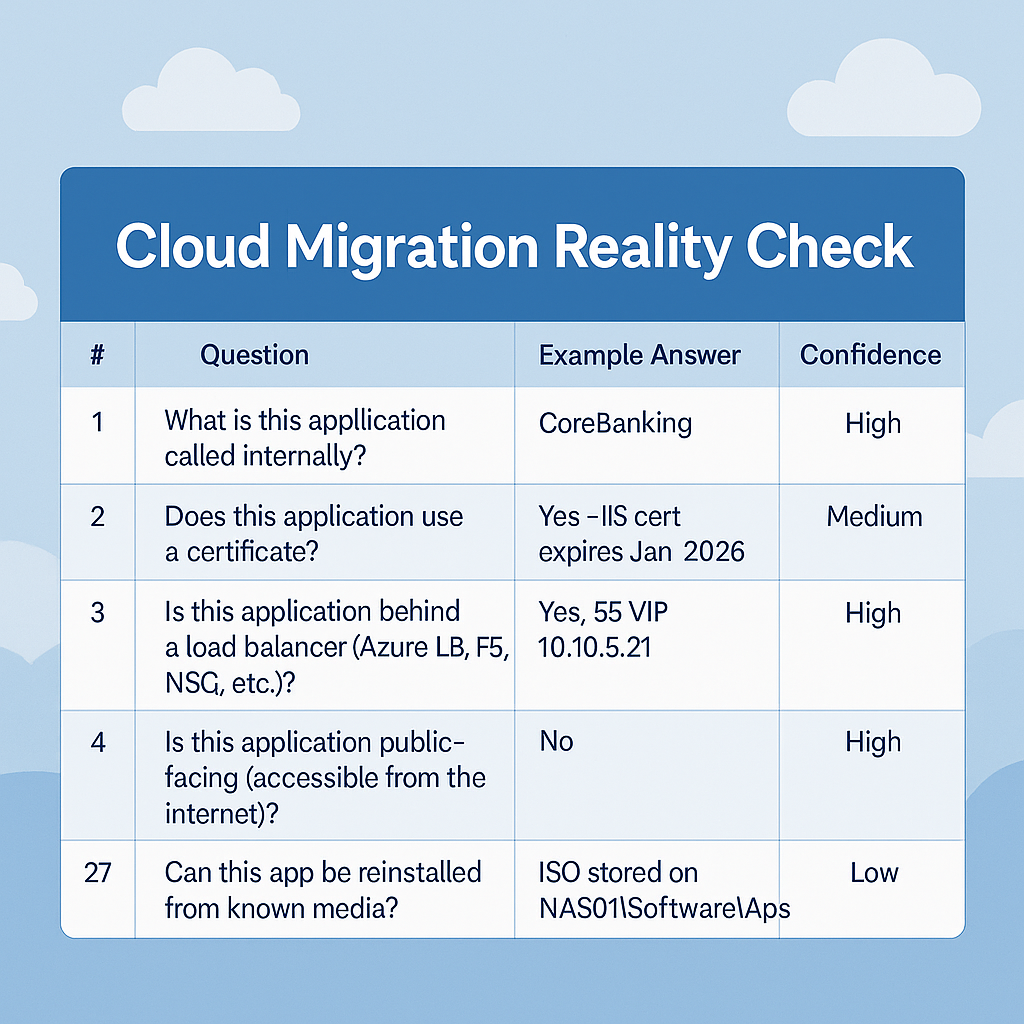
  1. What is this application called internally?
  2. Which environment is it in (Prod/Dev/QA/DR)?
  3. Which business unit or department owns this application?
  4. How critical is this application to business operations (High/Medium/Low)?
  5. Who is accountable for the business outcome if this app fails?
  6. Who maintains the app day-to-day or handles incidents?
  7. Which support queue or team handles this app?

Why this matters:

If you can't answer Question 5 ("Who's accountable if this fails?"), you're about to migrate an application with no business owner.

That means:
- Nobody to approve downtime windows
- Nobody to test post-migration
- Nobody to blame when it breaks in Azure (so IT gets blamed by default)
- Nobody who cares if you shut it down to save money

Real example from my environment:

Found an application consuming $2,400/month in Azure. Asked who owned it. Got three different answers. Traced it back - the business owner left the company in 2021. Application was still running. Nobody knew if anyone used it.

If you can't answer "who's accountable," that application probably shouldn't migrate.


Category 2: Vendor & Support (Questions 8-9)

These questions expose: Can we get help when it breaks?

  1. What is the software vendor or provider name?
  2. Who do we contact for vendor support (email/phone)?

Why this matters:

Post-migration, the application breaks. You call the vendor. Their response: "Who are you? We don't have an active support contract with your company."

Real example:

Migrated a critical reporting application to Azure. Week 2, database connection fails. Called vendor for support. Vendor contact was Steve, who retired in 2018. New vendor contact had no record of our license. Support contract was signed in 2015 under a company name we no longer use (pre-merger).

Took 6 weeks to re-establish vendor relationship and get support. Application was down the entire time.

If the person who maintains the vendor relationship left the company, you need to rebuild that relationship BEFORE migrating.


Category 3: Technical Architecture (Questions 10-17)

These questions expose: Do we actually understand how this works?

  1. Is it on-prem, VM, SaaS, container, or hybrid?
  2. Which OS, database, or runtime platform does it use?
  3. What other apps, services, or databases does it depend on?
  4. How do users authenticate (AD, local, custom)?
  5. Does this application use a certificate? If yes, where is it stored and when does it expire?
  6. Is this application behind a load balancer (Azure LB, F5, NSG, etc.)?
  7. Is this application public-facing (accessible from the internet)?
  8. Where is the installer or image stored?

Why this matters:

Question 12 ("What does it depend on?") is the migration killer.

Application A depends on Database B. Database B is shared by Applications C, D, and E. You can't migrate A without migrating B. But you can't migrate B until you migrate C, D, and E. Except E depends on Application F which you don't own.

You just discovered your "simple" migration requires coordination across 6 applications and 3 business units.

Certificate story (Question 14):

Migrated application to Azure. Worked great for 8 months. Then mysteriously stopped working. Nobody could figure it out.

Turns out: Certificate expired. Certificate was installed 6 years ago by someone who left. Nobody knew where the certificate request files were stored. Nobody knew the certificate password. Certificate was tied to a domain that was decommissioned in a merger.

Took 2 weeks to get new certificate issued and installed.

If you don't know where certificates are and when they expire, expect surprises in Azure.


Category 4: Licensing & Support Contracts (Questions 18-22)

These questions expose: Are we even allowed to run this in Azure?

  1. How is it licensed (per core, per user, subscription)?
  2. Where is the license or agreement reference stored?
  3. When does the vendor support contract expire?
  4. Is the vendor still active and reachable?
  5. Is this version still officially supported?

Why this matters:

Not all software licenses allow cloud hosting. Some licenses are tied to physical servers. Some licenses allow Azure but cost 3x more than on-premises.

The most common and expensive licensing mistake is misusing Azure Hybrid Benefit. Read our detailed guide on the $50K Azure Hybrid Benefit licensing mistake that triggers audit penalties.

Real example:

Migrated application to Azure. Vendor audit 6 months later: "Your license is for physical servers only. Running in Azure requires Enterprise Cloud License at $50K/year."

Nobody checked the license agreement before migration.

Question 21 ("Is the vendor still active?") is brutal but necessary:

We found applications from vendors who went out of business. Applications from vendors acquired by companies who discontinued the product. Applications from vendors who exist but no longer support this version.

If the vendor is gone, you're on your own. That changes the migration decision.


Category 5: Business Value & Risk (Questions 23-26)

These questions expose: Should we even migrate this?

  1. What business process does this application serve?
  2. What happens if this app becomes unavailable?
  3. What are the main issues or risks with this app?
  4. Why are we migrating this app (cost, performance, compliance)?

Why this matters:

Question 23 ("What business process?") forces the business case conversation.

Sometimes the answer is: "We're not sure. We think HR uses it for something."

That's your signal: This application is a retirement candidate, not a migration candidate.

Question 24 ("What happens if it's unavailable?") reveals truth:

If the answer is "Nothing critical" or "We're not sure," why are you spending money to migrate it?

Test: Turn it off for a weekend. If nobody notices, retire it.

Real example:

Found 12 applications consuming $18K/month in Azure. Turned them off as a "maintenance window." Waited 2 weeks.

Zero complaints. Zero tickets.

Deleted them. Saved $216K/year.

Not every application deserves migration. Some deserve deletion.


Category 6: Migration Planning (Questions 27-32)

These questions expose: Are we actually ready?

  1. Which Azure service fits best (VM, App Service, SQL MI)?
  2. Do we have updated documentation for this app?
  3. Has ownership been verified recently?
  4. Are all dependencies identified and documented?
  5. Can this app be reinstalled from known media?
  6. What is its readiness status (Green/Yellow/Red)?

Why this matters:

Question 31 ("Can it be reinstalled?") is the disaster recovery test.

If you can't reinstall the application from known media on-premises, you definitely can't rebuild it in Azure when something goes wrong.

Real story:

Application in Azure crashed. Needed to rebuild. Asked for installation media.

Answer: "We installed it in 2012. The ISO was on a file server that was decommissioned in 2017."

Spent 3 weeks trying to reconstruct the install. Eventually rebuilt from Azure Backup, but we were lucky.

If you can't answer "where's the installer," you're not ready to migrate.


Category 7: Compliance & Governance (Questions 33-37)

These questions expose: Will this pass audit?

  1. What type of data does it handle (Public/Internal/Confidential)?
  2. Which compliance frameworks apply (PCI, HIPAA, SOX)?
  3. Does it follow enterprise tagging standards?
  4. What is its backup or DR tier level?
  5. How many years of data retention are required?

Why this matters:

Question 34 ("Which compliance frameworks?") changes everything about where and how you migrate.

PCI data? Can't use certain Azure regions. Must use specific network configurations. Extra logging required.

HIPAA? BAA agreements with Microsoft. Specific encryption requirements. Audit logging mandatory.

If you migrate before answering this, you fail your next audit.

Tagging (Question 35) is the cost allocation killer:

Migrated 500 VMs to Azure. CFO wants cost by department. You need tags.

But you didn't tag during migration. Now you have to:
- Identify which department owns each VM (nobody remembers)
- Apply tags retroactively (manual work)
- Handle exceptions (PaaS services that auto-create resources without tags)

Should have tagged during migration. Can't fix it easily afterward.


Category 8: Cost & Operations (Questions 38-41)

These questions expose: Can we actually afford this?

  1. Which cost center or charge code funds this app?
  2. What will it cost monthly in Azure?
  3. What does it currently cost to host?
  4. Can it be optimized, consolidated, or retired?

Why this matters:

Question 39 vs. 40 (Azure cost vs. current cost) is where migration ROI dies.

On-prem: $800/month (amortized hardware, shared infrastructure)
Azure: $2,400/month (VM + storage + backup + bandwidth + PaaS services)

Cloud doesn't automatically save money. Sometimes it costs 3x more.

Real example:

Migrated application to Azure. Cost $4,200/month. Business owner shocked. "I thought cloud was supposed to be cheaper?"

Current cost on-prem: $1,100/month.

If we'd answered Questions 39 & 40 before migrating, we would have killed this migration.


Azure Migration Cost Reality: What the Spreadsheet Reveals

The question everyone asks: "What will Azure migration cost?"

The honest answer: "More than leadership expects, less than doing nothing."

Here's what your spreadsheet reveals about actual Azure migration costs that sales presentations never mention.

The Three Cost Categories Nobody Budgets For

1. Migration Execution Costs (One-Time)

What leadership budgets:
- Azure Migrate licensing: $0 (free tool)
- Network bandwidth: Included in current costs
- Staff time: "They're already employees"

What it actually costs:

Discovery phase: 3-6 months × $15K/month consulting = $45-90K
Assessment tools: Azure Migrate + dependency mapping = $0-5K
Migration tooling: Azure Site Recovery, migration services = $0-15K
Network acceleration: ExpressRoute setup or increased bandwidth = $10-50K
Staff overtime/contractors: Weekend migrations, rollbacks = $20-50K
Training: Azure certifications, vendor training = $5-15K
Consultant fees: When internal team gets stuck = $50-200K

Total migration execution: $130K - $425K (for 50-100 applications)
Per-application cost: $1,300 - $4,250 each

The spreadsheet forces this conversation on Day 1, not Month 12.

2. Post-Migration Azure Costs (Recurring Monthly)

Leadership expectations based on sales pitch:

Current on-prem: $50K/month
Azure promise: 30% savings
Expected Azure cost: $35K/month

Actual Azure costs after migration:

Compute (VMs right-sized up): $28K/month
Storage (3x redundancy, premium for databases): $12K/month
Networking (ExpressRoute, VPN, bandwidth): $8K/month
Backup & DR (Azure Site Recovery, snapshots): $6K/month
Security (Defender, Key Vault, firewalls): $4K/month
Monitoring (Log Analytics, Application Insights): $3K/month
PaaS migrations (SQL MI, App Service): $15K/month

Actual Azure monthly: $76K/month
vs. Current on-prem: $50K/month
Increase: +52% ($26K/month more)

Why the increase?

  • On-prem costs were amortized (hardware paid off)
  • Azure charges for redundancy you got "free" on-prem
  • Bandwidth charges that didn't exist on-prem
  • Premium storage for performance parity
  • Backup costs now explicit (were "free" on SAN)

Question 39 vs. 40 from the spreadsheet prevents this surprise.

3. Hidden Operational Costs (Ongoing)

Costs that appear 6-12 months post-migration:

License true-ups: Vendor audits reveal under-licensing = $50-200K
Failed migrations redo: Applications that don't work, rebuild = $25-100K
Performance fixes: Right-sizing, premium storage upgrades = $10-50K/year
Compliance gaps: Encryption, logging, audit requirements = $15-40K
Training updates: Continuous Azure training as services change = $10-30K/year
Consultant retainer: For issues internal team can't solve = $60-150K/year

Hidden first-year costs: $170K - $570K

Total Cost of Migration Example:

Pre-migration assessment (using spreadsheet): $15K consulting
Migration execution: $300K
First year Azure operations: $912K (76K × 12)
Hidden costs first year: $370K

Total Year 1: $1,597K
vs. On-prem Year 1: $600K (50K × 12)

Cloud migration cost increase: +$997K first year
Break-even: Year 3-4 (if you optimize aggressively)

The spreadsheet doesn't prevent these costs. It makes them visible BEFORE you commit.

Azure Migrate Tool Cost vs. This Spreadsheet Approach

Azure Migrate (Microsoft's free tool):

What it does well:
- Discovers VMs and dependencies automatically
- Performance baseline data collection
- Right-sizing recommendations
- Cost estimates based on VM metrics

What it doesn't do:

  • ❌ Can't tell you if the business owner left the company
  • ❌ Can't tell you where the installer ISO is stored
  • ❌ Can't tell you if the vendor still exists
  • ❌ Can't tell you if license allows cloud hosting
  • ❌ Can't tell you if anyone actually uses the application
  • ❌ Can't tell you what the long-term plan is

Azure Migrate discovers resources. This spreadsheet discovers organizational readiness.

You need both.

For the complete migration cost breakdown including hidden expenses and ROI formulas, see our guide on why Azure migration ROI calculations are wrong.

Week 1-4: Deploy Azure Migrate (technical discovery)
Week 5-12: Fill out spreadsheet per application (business discovery)
Week 13+: Decide what to migrate based on BOTH datasets

Cost comparison:

Azure Migrate only:
- Cost: $0 (free tool)
- Result: Accurate technical inventory, inaccurate business understanding
- Risk: Migrate wrong applications, miss retirement candidates
- Wasted spend: $500K - $2M on migrations that shouldn't happen

Azure Migrate + Spreadsheet:
- Cost: $15K (consulting to facilitate spreadsheet completion)
- Result: Accurate technical + business inventory
- Risk: Only migrate what makes business sense
- Savings: $500K - $2M avoided waste

ROI: 33x to 133x return on spreadsheet investment

The spreadsheet is the cheapest insurance policy in your Azure migration.


Category 9: Rationalization & Lifecycle (Questions 42-52)

These questions expose: What's the actual plan?

  1. What is its migration priority (High/Med/Low)?
  2. How many servers/VMs are part of this app?
  3. Which databases are associated with this app?
  4. Is there an existing monitoring dashboard or link?
  5. How often does it generate incidents (monthly avg)?
  6. Are there legacy or unsupported components?
  7. What's the rationalization plan (Rehost, Refactor, etc.)?
  8. Has leadership approved migration or disposition?
  9. When was it last validated as still needed?
  10. What is the long-term plan (SaaS replacement, retire)?
  11. When should it be re-evaluated (6mo/12mo)?

Why this matters:

Question 48 ("Rationalization plan") forces the 7R decision BEFORE migration:
- Rehost (lift-and-shift to IaaS)
- Refactor (small code changes for PaaS)
- Rearchitect (significant redesign)
- Rebuild (rewrite from scratch)
- Replace (buy SaaS alternative)
- Retire (delete it)
- Retain (keep on-prem)

Most organizations default to Rehost (lift-and-shift) because they don't understand the application well enough to choose anything else.

But Rehost is often the most expensive option.

Question 51 ("Long-term plan?") changes the migration decision:

If the answer is "Replace with Salesforce in 18 months," don't migrate it to Azure.

Keep it on-prem for 18 months, then turn it off when Salesforce goes live.

We migrated applications with 12-month retirement dates. Wasted money on migrations that should never have happened.


The Red Flags

As you fill out the spreadsheet, watch for these danger signs:

🚩 "I think it's owned by..." → Ownership not validated
🚩 "The person who knew this left in 2020" → Institutional knowledge loss
🚩 "We're not sure where the installer is" → Can't rebuild if it breaks
🚩 "The vendor might still support it" → Licensing risk
🚩 "Low confidence" on multiple answers → Not ready to migrate
🚩 "We'll figure it out after migration" → Recipe for disaster
🚩 Can't answer Questions 5, 9, 17, or 31 → STOP. Do discovery first.

Each red flag adds risk. Three or more red flags = don't migrate yet.


How to Use This Spreadsheet

Step 1: Leadership announces "we're going to the cloud"

Stop. Don't start designing Azure architecture.

Step 2: Open the spreadsheet

Project it in the conference room.

Step 3: Ask: "How many applications do we have?"

If nobody knows → Discovery project comes before migration project.

Step 4: For each application, fill out the questionnaire

  • Business owner answers business questions (1-7, 23-26, 38-41)
  • IT answers technical questions (10-17, 27-32, 42-47)
  • Compliance answers governance questions (33-37)
  • Everyone collaborates on vendor/licensing (8-9, 18-22)

Step 5: Count the red flags

  • 0-2 red flags: Probably ready to migrate
  • 3-5 red flags: Need discovery work first
  • 6+ red flags: Not ready, might be retirement candidate

Step 6: Only then, decide the 7R action

Rehost, Refactor, Rearchitect, Rebuild, Replace, Retire, or Retain.

Step 7: Prioritize based on readiness, not executive preference

Migrate applications with high business value + low red flags first.

Don't migrate applications with low business value + high red flags. Retire them instead.


Azure Cloud Migration Strategy: The Right Sequence

Microsoft's CAF documentation starts with landing zones and governance.

That's backwards.

Here's the actual sequence that prevents migration failure:

Phase 1: Discovery (Months 1-3)

Goal: Know what you own before deciding what to migrate.

Activities:
1. Deploy Azure Migrate for technical discovery
2. Deploy spreadsheet for organizational discovery
3. Identify application owners (or lack thereof)
4. Document dependencies across applications
5. Classify applications by criticality and readiness

Deliverables:
- Complete application inventory with owners
- Dependency maps showing migration complexity
- Red flag count per application
- Preliminary retirement candidate list

Exit criteria: Can answer "How many applications do we have?" with confidence

Phase 2: Rationalization (Months 3-4)

Goal: Decide the 7R action for every application BEFORE designing Azure architecture.

The 7Rs with spreadsheet guidance:

Rehost (Lift-and-Shift):
- Spreadsheet shows: Green status, simple architecture, no compliance issues
- Best for: Applications with short remaining life (2-4 years)
- Azure target: IaaS VMs
- Cost: Moderate (highest Azure spend, lowest migration effort)

Refactor (Minor Changes for PaaS):
- Spreadsheet shows: Modern architecture, documented dependencies, active vendor
- Best for: Applications worth investing in
- Azure target: App Service, SQL Database, Container Apps
- Cost: Moderate (lower Azure spend, moderate migration effort)

Rearchitect (Significant Redesign):
- Spreadsheet shows: Core business app, high value, legacy architecture
- Best for: Strategic applications, 5+ year lifespan
- Azure target: Microservices, serverless, PaaS
- Cost: High (lowest Azure spend long-term, highest migration effort)

Rebuild (Rewrite from Scratch):
- Spreadsheet shows: No vendor support, no installation media, critical business value
- Best for: Applications you can't live without but can't migrate
- Azure target: Modern stack (React, .NET Core, PostgreSQL)
- Cost: Highest (migration effort = new development)

Replace (Buy SaaS Alternative):
- Spreadsheet shows: Generic business function, vendor exists, high maintenance cost
- Best for: Commodity applications (email, CRM, HR)
- Azure target: SaaS product (Salesforce, Workday, M365)
- Cost: Moderate (no migration effort, subscription fees)

Retire (Delete It):
- Spreadsheet shows: No owner, no business value, can't answer basic questions
- Best for: 20-40% of your application portfolio
- Azure target: None (decommission)
- Cost: Lowest (savings from deletion)

Retain (Keep On-Premises):
- Spreadsheet shows: Compliance restriction, vendor limitation, hardware dependency
- Best for: Regulated workloads, specialized hardware
- Azure target: None (stays on-prem or hybrid)
- Cost: Zero migration (status quo)

Typical distribution after spreadsheet completion:

50-60% → Rehost (lift-and-shift to Azure VMs)
10-15% → Refactor (PaaS migration)
5-10% → Rearchitect (strategic redesign)
2-5% → Rebuild (complete rewrite)
10-15% → Replace (buy SaaS)
20-40% → Retire (delete)
5-10% → Retain (keep on-prem)

Notice: 20-40% retirement rate is normal and healthy.

The spreadsheet reveals retirement candidates that executive mandates hide.

Phase 3: Planning (Months 4-6)

Goal: Design Azure architecture for the applications that survived rationalization.

Now you can design landing zones because you know:
- How many subscriptions you need (based on apps migrating)
- Which compliance requirements apply (from spreadsheet)
- Network requirements (based on dependency maps)
- Cost center allocation (from business owner data)
- Governance policies needed (based on data classification)

Architecture decisions driven by spreadsheet data:

Compliance requirements (Question 34) → Azure region selection
Data classification (Question 33) → Network isolation design
Business criticality (Question 4) → SLA and redundancy levels
Dependencies (Question 12) → Migration wave grouping
Cost centers (Question 38) → Subscription structure

This is when you read CAF documentation - after you know what you're building for.

Phase 4: Pilot (Months 6-9)

Goal: Validate approach with low-risk applications.

Pilot selection criteria from spreadsheet:

Choose applications with:
- ✅ Green readiness status (low red flag count)
- ✅ Low business criticality (failure won't kill company)
- ✅ Simple architecture (few dependencies)
- ✅ Active vendor support (can get help if needed)
- ✅ Documented owner (someone to test and approve)

Don't choose:
- ❌ Most critical application (too risky for pilot)
- ❌ Most complex application (too many variables)
- ❌ Application with vendor issues (will confuse pilot results)
- ❌ Application with no owner (can't validate success)

Pilot success metrics:

  • Migration completed within time estimate (±20%)
  • Application works in Azure (full functionality)
  • Performance acceptable (meets SLAs)
  • Cost within estimate (±30%)
  • Business owner satisfied (would migrate more)

If pilot fails, fix issues before scaling. Don't blame Azure - blame incomplete discovery.

Phase 5: Migration Waves (Months 9-24)

Goal: Systematic migration in prioritized groups.

Wave planning based on spreadsheet:

For enterprise hybrid migration patterns connecting on-premises infrastructure to Azure, see our guide on Azure Migrate for enterprise hybrid environments.

Wave 1 (Months 9-12): Quick Wins
- Applications: High value + low risk (green status + simple)
- Goal: Build momentum and confidence
- Typical: 10-20 applications

Wave 2 (Months 12-18): Strategic Applications
- Applications: High value + moderate risk (yellow status)
- Goal: Migrate core business applications
- Typical: 20-40 applications

Wave 3 (Months 18-24): Complex Migrations
- Applications: High value + high risk (red flags but necessary)
- Goal: Tackle difficult migrations with lessons learned
- Typical: 10-30 applications

Wave 4 (Months 24-36): Long Tail
- Applications: Low value + low risk (keep if cheap to migrate)
- Goal: Finish remaining migrations
- Typical: 20-50 applications

Total migrated: 60-140 applications over 3 years

Not migrated (retired): 40-80 applications discovered through spreadsheet

Money saved from retirements: Often exceeds migration costs


The Conversation This Forces

CFO: "How much will Azure cost?"

You: "Can't answer yet. We don't know how many applications we're migrating."

CFO: "Well how many applications do we have?"

You: "That's what this spreadsheet helps us determine. Fill out these 55 questions for each application, then we can estimate cost."

CFO: "That sounds like it will take months."

You: "Yes. And if we skip it, the migration will cost 3x more and take twice as long. Choose."

This spreadsheet gives you the forcing function to have that conversation on day one, not year two.


What Success Looks Like

Mature organization (ready to migrate):

Every application has:
- ✅ Documented business owner with accountability
- ✅ Current vendor contact information
- ✅ Known installation media location
- ✅ Valid support contracts
- ✅ Documented dependencies
- ✅ Cost center assignment
- ✅ Compliance classification
- ✅ Rationalization decision (7R)
- ✅ Leadership approval

Every question answered with HIGH confidence.

Immature organization (not ready):

Applications have:
- ❌ "I think Bob owned this but he left"
- ❌ "Vendor contact in email from 2015"
- ❌ "Install media on a server we decommissioned"
- ❌ "Support contract maybe expired?"
- ❌ "Not sure what it depends on"
- ❌ "Cost center TBD"
- ❌ "Probably not HIPAA data?"
- ❌ "Leadership said migrate everything"

Most questions answered with LOW confidence or not at all.

If you're the second organization, this spreadsheet saves you from expensive migration failure.


Common Azure Migration Mistakes This Spreadsheet Prevents

Mistake #1: Migrating Applications Nobody Uses

How it happens:

Executive mandate: "Migrate everything to Azure by Q4."

IT response: "Okay, here's the server list from VMware. We'll migrate all of them."

Nobody asks: "Does anyone actually use ServerXYZ-2014?"

The cost:

Migrated application consuming $1,800/month in Azure. Ran for 18 months before someone asked "What is this?"

Investigation revealed: Application was replaced by SaaS product in 2020. Old server still running. Nobody shut it off.

Cost of not asking: $32,400 wasted ($1,800 × 18 months)

How spreadsheet prevents this:

Question 23: "What business process does this application serve?"
Question 50: "When was it last validated as still needed?"

If you can't answer both with confidence → Retirement candidate, not migration candidate.


Mistake #2: Ignoring Vendor Licensing Restrictions

How it happens:

You migrate application to Azure. Works great. Six months later, vendor audit letter arrives: "Your license doesn't permit cloud hosting. Please purchase Cloud License at $75K/year or cease Azure usage within 30 days."

How common is this:

Happens with:
- Oracle databases (license per core changes in cloud)
- SQL Server (need Azure Hybrid Benefit setup correctly)
- Third-party applications with "on-premises only" licenses
- Vendor products with separate cloud SKUs

The cost:

Emergency license purchase: $75K
Or emergency migration back to on-prem: $50K + downtime
Or cease business process: Unacceptable

How spreadsheet prevents this:

Question 18: "How is it licensed?"
Question 21: "Is the vendor still active and reachable?"
Question 22: "Is this version still officially supported?"

Action: Contact vendor BEFORE migration. Get cloud licensing terms in writing.

For a deep dive into the most common licensing mistake that causes $50K+ audit penalties, read: The $50K Licensing Mistake Noobs Make


Mistake #3: Dependency Hell

How it happens:

You migrate Application A to Azure. It breaks. Investigation reveals Application A depends on Database B which is still on-premises and requires 1ms latency that doesn't work across ExpressRoute.

Now you need to migrate Database B. But Database B supports Applications C, D, E, and F - all of which need testing if you migrate the database.

Your "simple" Application A migration just became 6 applications.

The cost:

Planned migration budget: $25K (one app)
Actual migration cost: $180K (six apps + coordination + testing)

Budget overrun: 7.2x planned cost

This is why accurate cost modeling is critical before migration. Our Azure cost optimization guide shows what actually reduces cloud costs versus what Azure Advisor recommends.

How spreadsheet prevents this:

Question 12: "What other apps, services, or databases does it depend on?"
Question 30: "Are all dependencies identified and documented?"

If you can't map full dependency chain, you're not ready to migrate.

Use Azure Migrate dependency mapping + manual verification through interviews.


Mistake #4: Lost Installation Media

How it happens:

Application breaks in Azure. Needs rebuild. Ask for installation media.

Answer: "We don't have it. Original installer was on Bob's laptop. Bob left in 2019."

Recovery options:
1. Try to restore from Azure Backup (might work)
2. Contact vendor for new installer (might not match configuration)
3. Rebuild from documentation (if it exists)
4. Give up and find SaaS replacement (expensive surprise)

The cost:

3 weeks of senior engineer time trying to rebuild: $30K
Consultant engagement to help: $20K
Emergency SaaS replacement: $50K implementation + $2K/month
Business impact from downtime: Incalculable

Total unexpected cost: $100K+

How spreadsheet prevents this:

Question 17: "Where is the installer or image stored?"
Question 31: "Can this app be reinstalled from known media?"

If answer is "No" or "We think so but not sure" → Fix this BEFORE migrating.


Mistake #5: No Business Owner = No Accountability

How it happens:

You migrate application to Azure. Post-migration validation needed. Who tests it?

Try to find business owner. Original owner left in 2020. Department reorganized twice since then. Nobody knows who owns this application now.

Application is running in Azure. Consuming $2,200/month. Nobody responsible. Nobody testing. Nobody knows if it works correctly.

The cost:

Application runs for 2 years in Azure: $52,800
Nobody validates it works correctly
Internal audit flags: "No owner documented for 47 applications"
Consultant engagement to identify owners: $45K
Cleanup project to retire orphaned apps: $80K

Total waste: $177,800

How spreadsheet prevents this:

Question 5: "Who is accountable for the business outcome if this app fails?"
Question 29: "Has ownership been verified recently?"

If you can't identify current owner with contact information → Don't migrate until you do.


Mistake #6: Certificate Expiration Surprise

How it happens:

Application works in Azure for 11 months. Month 12, it stops working. Nobody knows why.

After days of troubleshooting: Certificate expired. Certificate was installed 4 years ago by contractor who left. Nobody knew certificate existed. Nobody monitored expiration.

Certificate renewal requires:
- Finding original certificate request files (lost)
- Getting new certificate issued (2 week process)
- Installing without breaking production (risky)

The cost:

Application downtime: 12 days
Emergency contractor to rebuild certificate: $15K
Business impact from outage: $50K+

How spreadsheet prevents this:

Question 14: "Does this application use a certificate? If yes, where is it stored and when does it expire?"

Document ALL certificates BEFORE migration. Set up expiration monitoring.


Mistake #7: Compliance Violations

How it happens:

You migrate application to Azure. Works great. 6 months later, compliance audit.

Auditor question: "This application processes PCI cardholder data. Where's your Azure PCI attestation?"

Your answer: "We didn't know it processed PCI data."

Audit finding: Non-compliance. Remediate within 30 days or lose ability to process cards.

The cost:

Emergency PCI remediation:
- Move application to compliant Azure region: $25K
- Implement required logging: $15K
- Network isolation fixes: $35K
- Audit validation: $20K

Total unbudgeted cost: $95K

How spreadsheet prevents this:

Question 33: "What type of data does it handle?"
Question 34: "Which compliance frameworks apply?"

If answer includes PCI, HIPAA, SOX, etc. → Architecture changes BEFORE migration.


The Pattern:

Every mistake has the same root cause: Incomplete discovery before migration.

The spreadsheet forces complete discovery before you spend money.

Better to discover problems during spreadsheet completion (cost: $0) than during Azure migration (cost: $$$$$).


Azure Migration ROI Calculator: The Formula Nobody Teaches You

CFO question: "What's the ROI on this Azure migration?"

Standard consultant answer: "You'll save 30-40% over 3-5 years."

Actual answer: "Depends on 14 variables, and most organizations get negative ROI in Year 1-2."

Here's the ROI formula that accounts for reality, not sales presentations.

The Real ROI Formula

Total ROI = (Cost Savings - Migration Costs - Hidden Costs) / Total Investment
Break-Even Point = Total Investment / Annual Net Savings

Let's calculate actual numbers for a 100-application migration:

Year 1 Costs (Investment Phase)

Pre-Migration Costs:

Discovery consulting: $75,000 (3-6 months @ $15K/month)
Azure Migrate deployment: $5,000 (licenses, dependency tools)
Staff training: $15,000 (Azure certifications × 5 people)
Network upgrades: $40,000 (ExpressRoute setup, bandwidth increase)

Pre-migration total: $135,000

Migration Execution Costs:

Migration tooling: $10,000 (Azure Site Recovery, backup licenses)
Contractor support: $120,000 (weekend migrations, 6 months)
Project management: $45,000 (dedicated PM, 9 months)
Testing resources: $25,000 (test environments, validation tools)

Execution total: $200,000

First Year Azure Operational Costs:

Compute (right-sized VMs): $336,000 ($28K/month × 12)
Storage (premium + redundancy): $144,000 ($12K/month × 12)
Networking (ExpressRoute, VPN): $96,000 ($8K/month × 12)
Backup & DR: $72,000 ($6K/month × 12)
Security (Defender, Key Vault): $48,000 ($4K/month × 12)
Monitoring (Log Analytics): $36,000 ($3K/month × 12)
PaaS services (SQL MI, App Service): $180,000 ($15K/month × 12)

Azure operations Year 1: $912,000

Hidden Year 1 Costs:

License true-ups: $150,000 (vendor audits, under-licensing discovered)
Failed migrations redo: $75,000 (5 apps that didn't work, had to rebuild)
Performance remediation: $40,000 (premium storage upgrades, right-sizing adjustments)
Consultant emergency support: $100,000 (issues internal team couldn't solve)

Hidden costs Year 1: $365,000

Total Year 1 Investment:

Pre-migration: $135,000
Execution: $200,000
Azure operations: $912,000
Hidden costs: $365,000

Total Year 1: $1,612,000

Year 1 "Savings" (What You Would Have Spent)

On-Premises Costs You Avoided:

Server hardware refresh: $0 (wasn't due until Year 3)
Datacenter rent: $240,000 ($20K/month)
Power & cooling: $60,000 ($5K/month)
Storage array maintenance: $36,000 ($3K/month)
Network equipment: $24,000 ($2K/month)
Backup licenses: $18,000 ($1.5K/month)
Staff salaries: $450,000 (3 people no longer needed)
Software maintenance: $72,000 ($6K/month)

Total avoided costs Year 1: $900,000

Actual Year 1 ROI

Total Investment Year 1: $1,612,000
Total Avoided Costs Year 1: $900,000

Net Year 1 Cost: -$712,000 (loss)
ROI Year 1: -44%

You're $712K in the hole after Year 1.

This is normal. Cloud migration is a 3-5 year investment, not Year 1 savings.

Break-Even Analysis

Year 2 Costs:

Azure operations: $730,000 (20% cost reduction from optimization)
Hidden costs: $100,000 (lower than Year 1 as issues are resolved)

Total Year 2: $830,000

Year 2 Avoided Costs:

On-prem recurring costs: $900,000 (same as Year 1)

Net Year 2 Cost: +$70,000 (savings)

Cumulative Costs:

Year 1 net cost: -$712,000
Year 2 net savings: +$70,000

Cumulative after Year 2: -$642,000 (still negative)

Year 3 Costs:

Azure operations: $657,000 (10% reduction from further optimization)
Hidden costs: $50,000 (minimal as operations mature)

Total Year 3: $707,000

Year 3 Avoided Costs:

On-prem recurring costs: $900,000
Plus avoided hardware refresh: $300,000 (refresh cycle would have hit)

Total Year 3 avoided: $1,200,000
Net Year 3 savings: +$493,000

Cumulative Costs:

Year 1 net cost: -$712,000
Year 2 net savings: +$70,000
Year 3 net savings: +$493,000

Cumulative after Year 3: -$149,000 (still slightly negative)

Break-even point: Month 38-40 (Year 4, Quarter 1)

This is the honest ROI timeline. Not "30% savings immediately."

The Variables That Change Everything

The 14 ROI variables from the spreadsheet:

  1. Current on-prem cost accuracy (Question 40) - Most organizations underestimate this
  2. Azure cost estimation (Question 39) - Most organizations underestimate this too
  3. Application retirement rate (Questions 41, 47-48) - Higher rate = faster ROI
  4. Migration complexity (Questions 10-17, 30) - More dependencies = higher cost
  5. Staff efficiency (Questions 6-7, 46) - Can you reduce headcount or just shift it?
  6. Licensing optimization (Questions 18-22) - Azure Hybrid Benefit, Reserved Instances
  7. Failed migration rate (Questions 29, 31-32) - How many need redo?
  8. Hidden cost discovery (Questions 14, 21, 26) - Certificates, vendor audits, compliance gaps
  9. Hardware refresh timing (Question 50) - How soon would you need to buy new servers?
  10. Compliance requirements (Questions 33-37) - Do you need premium tiers?
  11. Business criticality (Question 4) - High-criticality = higher Azure costs (redundancy)
  12. Optimization discipline (Question 52) - Will you actively manage costs post-migration?
  13. Vendor lock-in escape (Questions 8-9, 21) - Can you negotiate better rates?
  14. Operational maturity (Questions 27-30) - Ready for PaaS savings or stuck in IaaS?

Adjust any 3 of these variables by 20%, and your break-even moves by 6-12 months.

The ROI Scenarios

Scenario A: Aggressive Optimization + High Retirement Rate

Applications inventoried: 100
Applications retired using spreadsheet: 40 (40% retirement rate)
Applications migrated: 60

Year 1 investment: $1,100,000 (lower due to fewer migrations)
Year 1 avoided costs: $900,000
Year 1 net cost: -$200,000

Break-even: Month 15-18 (Year 2, middle)

Scenario B: Lift-and-Shift + No Optimization

Applications inventoried: 100
Applications retired: 10 (10% retirement rate)
Applications migrated: 90

Year 1 investment: $1,850,000 (higher due to more migrations)
Year 1 avoided costs: $900,000
Year 1 net cost: -$950,000

Break-even: Month 48-60 (Year 4-5)

Scenario C: Reality (Most Organizations)

Applications inventoried: 100
Applications retired: 25 (25% retirement rate)
Applications migrated: 75

Year 1 investment: $1,612,000 (as calculated above)
Year 1 avoided costs: $900,000
Year 1 net cost: -$712,000

Break-even: Month 38-40 (Year 4, Q1)

The spreadsheet drives you toward Scenario A by forcing retirement decisions.


Migration Velocity Calculator: How Long Will This Actually Take?

Project manager question: "How long will this migration take?"

Standard answer: "18-24 months for 100 applications."

Actual answer: "Depends on application complexity, not just quantity."

Here's how to calculate actual migration velocity using spreadsheet data.

The Velocity Formula

Migration Velocity = Applications Migrated / Time Period
Adjusted Velocity = (Simple Apps à 1.0) + (Medium Apps à 2.5) + (Complex Apps à 5.0)
Realistic Timeline = Adjusted Velocity / Weekly Capacity

Application Complexity Scoring (From Spreadsheet)

Simple Applications (Velocity Factor: 1.0)

Characteristics:
- ✅ Single server, no dependencies (Question 12, 43)
- ✅ Known owner, current contact (Questions 5-7)
- ✅ Modern OS, supported version (Question 11, 22)
- ✅ Standard authentication (AD) (Question 13)
- ✅ No compliance requirements (Question 34)
- ✅ Installation media available (Question 17, 31)
- ✅ Low business criticality (Question 4)
- ✅ Green readiness status (Question 32)

Migration time: 2-3 weeks per application

Examples:
- Internal web server (IIS, no database)
- File server (SMB shares only)
- Jump box or admin workstation
- Simple API gateway

Medium Applications (Velocity Factor: 2.5)

Characteristics:
- ⚠️ Multi-tier (web + app + database) (Questions 11, 43-44)
- ⚠️ Some dependencies (2-3 systems) (Question 12)
- ⚠️ Multiple owners or handoff needed (Questions 5-7)
- ⚠️ Certificate management required (Question 14)
- ⚠️ Load balancer or public-facing (Questions 15-16)
- ⚠️ Medium business criticality (Question 4)
- ⚠️ Yellow readiness status (Question 32)

Migration time: 5-8 weeks per application

Examples:
- Line-of-business web application
- Department database with 3 dependent apps
- Customer portal with authentication
- Reporting system with scheduled jobs

Complex Applications (Velocity Factor: 5.0)

Characteristics:
- 🚨 Extensive dependencies (5+ systems) (Question 12)
- 🚨 Multiple databases (3+) (Question 44)
- 🚨 Legacy components or unsupported versions (Question 47)
- 🚨 Compliance requirements (PCI, HIPAA) (Question 34)
- 🚨 Vendor coordination needed (Question 9)
- 🚨 High business criticality (Question 4)
- 🚨 Red readiness status or red flags (Question 32)
- 🚨 Custom authentication or complex network (Questions 13, 15)

Migration time: 12-20 weeks per application

Examples:
- ERP system (SAP, Oracle)
- Core banking platform
- Healthcare EMR system
- Manufacturing execution system

Sample Portfolio Calculation

Your 100-application portfolio after spreadsheet completion:

Simple applications: 45 (45% of portfolio)
Medium applications: 35 (35% of portfolio)
Complex applications: 15 (15% of portfolio)
Retired (not migrating): 5 (5% of portfolio)

Total to migrate: 95 applications

Adjusted velocity calculation:

Simple: 45 apps × 1.0 factor = 45 velocity units
Medium: 35 apps × 2.5 factor = 87.5 velocity units
Complex: 15 apps × 5.0 factor = 75 velocity units

Total adjusted velocity: 207.5 velocity units

Team capacity estimation:

Migration team: 3 engineers
Concurrent migrations: 2 (conservative, allows for issues)
Velocity per week: 2 apps in parallel = 2 weeks per simple app pair

Weekly capacity: 1.0 velocity units per week (conservative)

Timeline calculation:

Total velocity needed: 207.5 units
Weekly capacity: 1.0 units

Estimated timeline: 207.5 weeks = 48 months (4 years)

Wait, 4 years? That seems long.

Yes. Because we're being realistic about complexity, not optimistic about quantity.

Accelerating Migration Velocity

Option 1: Increase Team Size

Migration team: 6 engineers (double the team)
Concurrent migrations: 4
Weekly capacity: 2.0 units per week

Revised timeline: 207.5 / 2.0 = 104 weeks = 24 months (2 years)
Added cost: +$600,000 for additional staff

Option 2: Prioritize Simple Applications First

Phase 1: Migrate 45 simple apps first
Velocity: 45 units / 1.0 weekly = 45 weeks (11 months)

Phase 2: Migrate 35 medium apps
Velocity: 87.5 units / 1.0 weekly = 88 weeks (22 months)

Phase 3: Migrate 15 complex apps
Velocity: 75 units / 1.0 weekly = 75 weeks (18 months)

Total timeline: 208 weeks = 48 months (same as before)

But: Quick wins in first 11 months, builds momentum

Option 3: Increase Retirement Rate

Re-evaluate 95 applications to migrate
Use spreadsheet Questions 23-26, 41, 51 to find more retirement candidates

New breakdown:
Simple: 45 → 30 (retire 15 unused simple apps)
Medium: 35 → 25 (retire 10 redundant medium apps)
Complex: 15 → 10 (replace 5 complex with SaaS)
Total to migrate: 65 applications (30% reduction)

New velocity needed:
Simple: 30 Ã 1.0 = 30
Medium: 25 Ã 2.5 = 62.5
Complex: 10 Ã 5.0 = 50
Total: 142.5 velocity units

Timeline: 142.5 / 1.0 = 143 weeks = 33 months (2.75 years)

Savings: 15 months faster + reduced Azure spend from fewer applications

Option 4: Parallel Consulting Support

Internal team: Handles simple + medium apps (117.5 units)
Consultant team: Handles complex apps in parallel (75 units)

Internal timeline: 117.5 / 1.0 = 118 weeks (27 months)
Consultant timeline: 75 / 2.0 = 38 weeks (9 months, faster with more resources)

Total timeline: 27 months (consultant finishes year earlier)
Added cost: +$500K for consultant engagement

Trade-off: Spend $500K to save 21 months

The Velocity Dashboard

Track these metrics monthly from spreadsheet data:

Metric 1: Applications Completed This Month
Target: Based on portfolio mix (simple/medium/complex ratio)
Actual: Track completions
Variance: Red if >2 weeks behind target

Metric 2: Average Days Per Application
Simple target: 14-21 days
Medium target: 35-56 days
Complex target: 84-140 days

Metric 3: Rework Rate
Target: <10% (1 in 10 migrations needs redo)
Actual: Track failed migrations requiring rebuild
Root cause: Usually incomplete spreadsheet discovery

Metric 4: Retirement Discovery Rate
Target: Find 2-3 more retirement candidates per month
Actual: Track applications killed after deeper analysis
Impact: Velocity improvement from not migrating them

Metric 5: Dependency Surprise Rate
Target: <5% (dependency discovered during migration, not in spreadsheet)
Actual: Track Question 12 accuracy
Root cause: Incomplete dependency mapping

If Metric 3 (rework) or Metric 5 (surprises) exceed targets → Stop and improve spreadsheet process.

Better to slow down discovery than speed up and redo migrations.


The 18-Week Implementation Timeline: Tactical Execution Plan

Question: "Okay, we filled out the spreadsheet. Now what?"

Answer: Here's the exact week-by-week plan from spreadsheet completion to first production migration.

This timeline assumes:
- ✅ Spreadsheet completed for 100 applications
- ✅ Rationalization decisions made (7R for each app)
- ✅ Leadership approval secured
- ✅ Migration team assigned (3 engineers minimum)

Phase 1: Planning & Preparation (Weeks 1-6)

Week 1: Landing Zone Design

Goal: Design Azure architecture based on spreadsheet data

Activities:
- Review compliance requirements (Question 34 from all apps)
- Determine subscription structure (based on Questions 33, 38)
- Design network topology (based on Questions 15-16, ExpressRoute needs)
- Select Azure regions (based on compliance + performance requirements)

Deliverables:
- Landing zone architecture document
- Subscription naming convention
- Network diagram (hub-and-spoke or virtual WAN)
- Cost center to subscription mapping

Key decisions driven by spreadsheet:

If >20% of apps have PCI/HIPAA data (Question 34) → Isolated compliance subscriptions
If >30% of apps are public-facing (Question 16) → Application Gateway or Front Door
If >50% of apps are high-criticality (Question 4) → Multi-region design
If dependency count >100 connections (Question 12) → Hub-and-spoke mandatory

Week 2: Azure Governance Setup

Goal: Implement policies, tagging, and controls before any migrations

Activities:
- Deploy Azure Policy based on compliance needs (Question 34)
- Create tagging taxonomy (Questions 3, 38 - department, cost center, environment)
- Set up RBAC structure (Question 7 - map support teams to Azure roles)
- Configure Azure Defender and security baselines (Question 33 - data classification)

Deliverables:
- Azure Policy assignments (required tags, allowed regions, allowed resources)
- Tag taxonomy spreadsheet (Department, Application, Environment, CostCenter, Owner)
- RBAC role matrix (who can do what in each subscription)
- Security baseline configuration (NSGs, ASC policies, Key Vault setup)

Validation:
- Deploy test VM → Verify policy enforcement works
- Tag test VM → Verify cost allocation works
- Test RBAC → Verify permissions correctly assigned

Week 3: Cost Management Foundation

Goal: Set up cost tracking BEFORE migrations start

Activities:
- Create Azure Budgets for each subscription (based on Question 39 estimates)
- Set up cost allocation tags (Question 38 - cost centers from spreadsheet)
- Configure Cost Management alerts (thresholds at 50%, 75%, 90%, 100%)
- Build cost reporting dashboard (by application, by department, by environment)

Deliverables:
- Budget alerts configured (email to finance + IT)
- Cost allocation tagging automated (via policy)
- Weekly cost report template (Power BI or Excel)
- Showback/chargeback model documented

Why this matters:

Without cost tracking from Day 1:
Month 6: CFO asks "How much is Azure costing per department?"
Answer: "We don't know, we didn't tag resources."
Result: 6 months of manual tagging cleanup work

With cost tracking from Day 1:
Month 1: CFO asks "How much is Azure costing per department?"
Answer: "Here's the dashboard." (5 second answer)

Week 4: Network Connectivity

Goal: Establish hybrid connectivity before migrating anything

Activities:
- Deploy ExpressRoute circuit (or Site-to-Site VPN for pilot)
- Configure Azure Firewall or NVA if needed
- Set up DNS resolution (on-prem to Azure, Azure to on-prem)
- Test connectivity (ping, RDP, SQL connections)

Deliverables:
- ExpressRoute circuit provisioned and tested (or VPN tunnels up)
- DNS configured (conditional forwarders, Azure Private DNS)
- Network routing verified (can reach on-prem from Azure, Azure from on-prem)
- Firewall rules documented (what can talk to what)

Validation checklist:
- ✅ Can ping on-prem server from Azure
- ✅ Can ping Azure VM from on-prem
- ✅ Can RDP to Azure VM from on-prem
- ✅ Can access on-prem database from Azure (SQL, Oracle, etc.)
- ✅ DNS resolution works both directions
- ✅ Latency acceptable (<50ms for same-region ExpressRoute)

Week 5: Backup & DR Strategy

Goal: Define and implement backup before migrations

Activities:
- Review backup requirements (Question 36 - backup tier per application)
- Configure Azure Backup vault
- Set up backup policies (daily, weekly, monthly retention)
- Configure Azure Site Recovery for DR (Question 4 - high-criticality apps)

Deliverables:
- Backup policies created (Standard, Premium, Critical tiers)
- Backup vault configured in each subscription
- ASR vault configured for DR
- Recovery time objective (RTO) and recovery point objective (RPO) documented per app

Backup tier mapping from spreadsheet:

High-criticality apps (Question 4 = High) + RPO <1 hour (Question 36):
- Backup: Hourly snapshots + daily backups
- Retention: 30 days snapshots + 12 months daily
- DR: ASR enabled for instant failover
- Cost: $200-400/month per app

Medium-criticality apps (Question 4 = Medium) + RPO <24 hours:
- Backup: Daily backups
- Retention: 7 days daily + 4 weeks weekly
- DR: ASR optional
- Cost: $50-100/month per app

Low-criticality apps (Question 4 = Low) + RPO <7 days:
- Backup: Weekly backups
- Retention: 4 weeks
- DR: None (rebuild from installer if needed, Question 31)
- Cost: $10-25/month per app

Week 6: Pilot Application Selection

Goal: Choose 2-3 pilot applications using spreadsheet criteria

Activities:
- Filter applications by readiness status (Question 32 - Green only)
- Select low-risk pilots (Question 4 - Low or Medium criticality)
- Validate pilot criteria (simple architecture, known owner, good documentation)
- Get pilot approval from business owners (Questions 5-7)

Pilot selection criteria from spreadsheet:

Must-have criteria:
✠Green readiness status (Question 32)
✠Known business owner with contact info (Question 5)
✠Installation media available (Question 31)
✠Simple architecture - single server or 2-tier (Question 43)
✠No compliance requirements (Question 34 = Public/Internal data only)
✠Low/Medium criticality (Question 4)
✠Active vendor support (Questions 21-22)

Nice-to-have criteria:
✠Modern OS (Windows Server 2019+, RHEL 8+) (Question 11)
✠Standard authentication (AD) (Question 13)
✠No certificate complexity (Question 14)
✠Few dependencies (Question 12 - 0-2 systems)
✠Documented downtime window (Question 24 - non-critical)

Selected pilots example:

Pilot 1: Internal HR portal
- Single Windows Server 2022 VM
- SQL Express database
- 200 internal users
- Non-critical (can be down for a weekend)
- Owner: Jane Smith (HR Director)
- Readiness: Green

Pilot 2: Finance reporting tool
- Two-tier (web + database)
- IIS + SQL Server 2019
- 50 finance users
- Medium criticality (used monthly, not daily)
- Owner: Mark Johnson (CFO office)
- Readiness: Green

Pilot 3: IT monitoring dashboard
- Single Linux VM (Ubuntu 22.04)
- Grafana + Prometheus
- 10 IT users
- Low criticality (nice-to-have, not mission-critical)
- Owner: IT Operations team
- Readiness: Green

Deliverables Week 6:
- Pilot application list (2-3 apps documented)
- Pilot migration plan (detailed steps for each)
- Pilot success criteria (how we define "success")
- Pilot schedule (when we migrate, who tests, rollback plan)


Phase 2: Pilot Migrations (Weeks 7-12)

Week 7-8: Pilot #1 Migration Execution

Monday-Tuesday: Pre-migration validation
- Verify all spreadsheet answers still accurate (Questions 1-52)
- Test backup/restore on-prem (ensure we can roll back)
- Confirm downtime window with business owner
- Document current state (screenshots, configs, baseline performance)

Wednesday: Migration day
- Azure Migrate replication complete (or Azure Site Recovery)
- Execute cutover during approved maintenance window
- Validate functionality in Azure
- Update DNS to point to Azure (gradual cutover)

Thursday-Friday: Post-migration validation
- Business owner testing (full functionality check)
- Performance testing (compare to baseline)
- User acceptance testing (UAT with real users)
- Documentation updates (runbooks, contact info, Azure resource IDs)

Week 8: Pilot #1 monitoring and stabilization
- Monitor for 1 week post-migration (errors, performance, cost)
- Fix any issues discovered
- Document lessons learned
- Calculate actual migration time vs. estimate

Week 9-10: Pilot #2 Migration Execution
- Repeat process from Pilot #1
- Apply lessons learned from Pilot #1
- Document any spreadsheet questions that need refinement

Week 11-12: Pilot #3 Migration + Retrospective
- Complete third pilot migration
- Hold retrospective with full team
- Update migration playbook based on lessons learned
- Calculate actual costs vs. estimates
- Update velocity model based on real data

Pilot retrospective questions:

1. Were spreadsheet answers accurate? Any surprises?
2. Which questions should we add to spreadsheet?
3. How long did each pilot actually take vs. estimate?
4. What went wrong? How do we prevent it in production migrations?
5. What went right? How do we replicate it?
6. Are cost estimates accurate? Any hidden costs discovered?
7. Is the team ready for production migration velocity?

Go/No-Go decision:

If pilots were successful:
- ✅ All 3 pilots functional in Azure
- ✅ No major surprises from spreadsheet gaps
- ✅ Business owners satisfied
- ✅ Team confident in process
- ✅ Costs within 30% of estimates

→ Proceed to production migrations in Week 13

If pilots had issues:
- ❌ Major functionality problems
- ❌ Significant spreadsheet data gaps revealed
- ❌ Business owners unhappy
- ❌ Team struggling with process
- ❌ Costs 50%+ over estimates

→ Fix issues before scaling, extend pilot phase 4-6 weeks


Phase 3: Production Migration Waves (Weeks 13-18+)

Week 13: Wave 1 Planning (First 10 Applications)

Goal: Select and prepare first production migration wave

Activities:
- Select 10 simple applications (Green status, low risk from spreadsheet)
- Group by dependency (applications that depend on each other migrate together)
- Schedule migration windows with business owners
- Assign applications to migration engineers (3-4 apps per engineer)

Wave 1 selection criteria:

✠Simple architecture (1-2 servers)
✠Green readiness (Question 32)
✠Low criticality (Question 4)
✠Modern OS (Question 11)
✠Few dependencies (Question 12)
✠Known owner (Question 5)
✠No compliance complexity (Question 34)

Week 14-16: Wave 1 Execution

Parallel migration approach:
- Engineer 1: Migrate apps 1-3 (staggered starts)
- Engineer 2: Migrate apps 4-7 (staggered starts)
- Engineer 3: Migrate apps 8-10 (staggered starts)

Weekly cadence:
- Monday: Migrate 2-3 apps (maintenance windows)
- Tuesday-Wednesday: Validation and testing
- Thursday: UAT with business owners
- Friday: Documentation and lessons learned

Expected velocity:

Week 14: Complete 3 applications
Week 15: Complete 4 applications
Week 16: Complete 3 applications

Total Wave 1: 10 applications in 3 weeks

Week 17: Wave 1 Review + Wave 2 Planning

Review metrics:
- Time per application (actual vs. estimated)
- Issues encountered (failed migrations, rework needed)
- Cost accuracy (Azure spend vs. estimates from Question 39)
- Business owner satisfaction score
- Spreadsheet accuracy (were answers correct?)

Wave 2 planning:
- Select next 15 applications (mix of simple + medium complexity)
- Apply lessons learned from Wave 1
- Update migration playbook
- Schedule next wave

Week 18: Wave 2 Kickoff

  • Begin next wave with confidence and refined process
  • Continue pattern: Plan → Execute → Review → Plan
  • Track cumulative metrics (applications migrated, total cost, velocity)

Production Migration Cost Breakdown Tool

Question: "Where is our Azure migration money actually going?"

Answer: Track it in these 7 cost buckets using spreadsheet data.

Cost Bucket #1: Discovery & Assessment

What it includes:
- Consultant fees for application inventory
- Staff time for spreadsheet completion (Questions 1-52)
- Azure Migrate deployment and configuration
- Dependency mapping tools
- Network assessment and design

Typical costs:

Consultant: $50-100K (12-16 weeks)
Internal staff time: $40-60K (diverted from other work)
Tools: $5-10K (Azure Migrate, dependency visualization)

Total discovery: $95-170K

Spreadsheet questions that impact this bucket:
- Question 12 (dependencies) - More dependencies = more discovery time
- Questions 5-7 (ownership) - Unknown owners = more discovery time
- Question 30 (documentation) - Poor docs = more discovery time

Optimization: Retire applications early (Questions 41, 51) to reduce apps requiring assessment


Cost Bucket #2: Network & Connectivity

What it includes:
- ExpressRoute circuit (or Site-to-Site VPN)
- Azure Firewall or third-party NVA
- VPN Gateway for site-to-site
- Bandwidth upgrades (on-prem internet connection)
- DNS infrastructure (Azure Private DNS)

Typical costs:

ExpressRoute circuit: $1,500-5,000/month (recurring)
ExpressRoute setup fee: $2,000-10,000 (one-time)
Azure Firewall: $1,000-2,500/month (or NVA license)
VPN Gateway: $150-500/month
Bandwidth upgrade: $500-2,000/month

One-time network setup: $2,000-15,000
Recurring network: $3,150-10,000/month

Spreadsheet questions that impact this bucket:
- Question 16 (public-facing) - More public apps = more complex network
- Question 34 (compliance) - PCI/HIPAA = dedicated circuits or encryption
- Question 12 (dependencies) - High dependency = need ExpressRoute, not VPN

Optimization: Use VPN for pilot, upgrade to ExpressRoute only if latency requires it


Cost Bucket #3: Azure Infrastructure (Compute)

What it includes:
- Virtual machines (IaaS)
- Reserved instances (1-year or 3-year)
- Azure Hybrid Benefit licensing
- PaaS compute (App Service, Container Apps, Functions)
- Right-sizing adjustments post-migration

Typical costs (per application):

Simple app (single VM):

VM size: D4s_v5 (4 vCPU, 16GB RAM)
Cost: $200-300/month (pay-as-you-go)
With Reserved Instance (3-year): $120-180/month (40% savings)
With Azure Hybrid Benefit: $60-90/month (50% additional savings on Windows)

Medium app (3-tier: web + app + database):

Web tier: D4s_v5 × 2 (load balanced) = $400/month (RI + AHB)
App tier: D8s_v5 × 2 (load balanced) = $800/month (RI + AHB)
Database tier: E8s_v5 × 1 (SQL Server) = $600/month (RI + AHB)

Total compute per app: $1,800/month

Complex app (5+ servers, high availability):

Multiple tiers, geo-redundant, premium storage
Total compute: $5,000-15,000/month

Spreadsheet questions that impact this bucket:
- Question 11 (OS/database) - Windows + SQL Server = higher licensing costs
- Question 4 (criticality) - High criticality = redundancy = 2x compute
- Question 43 (server count) - More servers = more cost
- Question 18 (licensing) - Can you use Azure Hybrid Benefit? (50% savings)

Optimization:
1. Enable Azure Hybrid Benefit for Windows + SQL (Question 18)
2. Purchase Reserved Instances for stable workloads (40% savings)
3. Right-size VMs after 30 days of monitoring (Question 46 - low incident rate = overprovisioned)


Cost Bucket #4: Azure Storage & Backup

What it includes:
- Managed disks (OS + data disks)
- Blob storage (backups, archives, media)
- Azure Backup vault storage
- Snapshot storage
- Data transfer out (egress)

Typical costs (per application):

Simple app storage:

OS disk: 128GB Premium SSD = $20/month
Data disk: 256GB Premium SSD = $40/month
Backup storage: 500GB (7 days retention) = $10/month
Snapshots: Minimal = $5/month

Total storage per app: $75/month

Medium app storage:

OS disks: 128GB × 3 VMs = $60/month
Data disks: 512GB × 2 (web), 1TB × 1 (database) = $200/month
Backup storage: 2TB (30 days retention) = $40/month
Snapshots: $20/month

Total storage per app: $320/month

Spreadsheet questions that impact this bucket:
- Question 36 (backup tier) - Higher tier = more retention = more cost
- Question 37 (retention years) - Longer retention = higher storage costs
- Question 4 (criticality) - Premium SSD vs. Standard SSD (3x price difference)

Optimization:
1. Use Standard SSD for non-critical workloads (Question 4 = Low)
2. Reduce backup retention to minimum required (Question 37)
3. Archive old backups to Cool or Archive tier (90% cost reduction)


Cost Bucket #5: Security & Compliance

What it includes:
- Microsoft Defender for Cloud (formerly Security Center)
- Azure Key Vault (certificates, secrets, keys)
- Azure DDoS Protection (if needed)
- Compliance logging and retention
- Security information and event management (SIEM) integration

Typical costs:

Per subscription baseline:

Defender for Servers: $15/server/month
Defender for SQL: $15/SQL instance/month
Defender for Storage: $10/storage account/month
Key Vault: $5/vault/month + $0.03/transaction
Log Analytics ingestion: $2.50/GB (5-10GB/day typical)

Security baseline per sub: $500-2,000/month (depends on resource count)

Compliance add-ons (PCI/HIPAA):

Dedicated SIEM: $5,000-20,000/month
Additional logging: +50% log volume
Extended retention: +$500-1,500/month
Audit reporting tools: $2,000-5,000/month

Compliance tax: +$7,500-26,500/month for regulated workloads

Spreadsheet questions that impact this bucket:
- Question 34 (compliance) - PCI/HIPAA = 2-3x security costs
- Question 33 (data classification) - Confidential = encryption + Key Vault
- Question 14 (certificates) - More certs = higher Key Vault transaction costs

Optimization:
1. Consolidate non-compliance workloads in shared subscriptions
2. Use Log Analytics commitment tiers (30% savings at 100GB/day)
3. Disable Defender for non-critical dev/test environments


Cost Bucket #6: Migration Execution

What it includes:
- Azure Site Recovery licensing (free, but storage costs)
- Migration tool licensing (if not using Azure Migrate)
- Contractor/consultant fees for migration weekends
- Testing and validation resources
- Rollback costs (if migration fails)

Typical costs:

Per-application migration:

Simple app:
- Replication storage: $50 (one-time)
- Migration weekend staff: $2,000 (overtime)
- Testing resources: $100 (temporary environments)
Total: $2,150 per app

Medium app:
- Replication storage: $200 (one-time)
- Migration weekend staff: $5,000 (more complex, longer)
- Testing resources: $500 (staging environment)
Total: $5,700 per app

Complex app:
- Replication storage: $500 (one-time)
- Consultant support: $15,000 (specialist needed)
- Testing resources: $2,000 (full staging replica)
Total: $17,500 per app

Portfolio of 100 apps:

45 simple à $2,150 = $96,750
35 medium à $5,700 = $199,500
15 complex à $17,500 = $262,500

Total migration execution: $558,750

Spreadsheet questions that impact this bucket:
- Question 32 (readiness) - Red status = higher execution cost (rework)
- Question 31 (installation media) - No media = longer migration (rebuild from scratch)
- Question 9 (vendor support) - No vendor = consultant needed (more expensive)

Optimization:
1. Retire applications before migrating (Questions 41, 51) - $0 migration cost
2. Improve readiness before execution (fix red flags in Questions 14, 17, 31)
3. Migrate simple apps first to build team expertise (lower consultant costs later)


Cost Bucket #7: Post-Migration Operations

What it includes:
- Ongoing Azure operations (monitoring, patching, support)
- Optimization efforts (right-sizing, cost management)
- Training and upskilling staff
- Tool licensing (monitoring, automation, ITSM integration)
- Vendor audit response (license compliance)

Typical costs:

First year post-migration:

Monitoring tools: $10,000-30,000 (Log Analytics, Application Insights, third-party)
Staff training: $15,000-40,000 (Azure certifications, role-based training)
Optimization consulting: $50,000-150,000 (first year heavy, reduces over time)
License true-ups: $50,000-200,000 (vendor audits, under-licensing discovered)
ITSM integration: $20,000-60,000 (ServiceNow, Jira integration)

First year operations: $145,000-480,000

Ongoing years (steady state):

Monitoring tools: $10,000-30,000/year
Continuous training: $10,000-20,000/year
Optimization efforts: $20,000-50,000/year (internal staff focus)
License maintenance: $30,000-80,000/year (renewals, true-ups)

Steady state operations: $70,000-180,000/year

Spreadsheet questions that impact this bucket:
- Question 22 (version support) - Unsupported versions = forced upgrades post-migration
- Question 46 (incident rate) - High incidents = more operational burden
- Questions 18-22 (licensing) - Unclear licenses = audit risk

Optimization:
1. Automate operations (runbooks, auto-scaling, auto-patching)
2. Train internal staff early (reduce consultant dependency)
3. Clean up licensing before migration (Questions 18-22) to avoid audit surprises


Cost Breakdown Summary Table

Total 3-Year Migration Cost Example (100 applications):

| Cost Bucket | Year 1 | Year 2 | Year 3 | 3-Year Total |
|-------------|--------|--------|--------|--------------|
| Discovery | $135K | $0 | $0 | $135K |
| Network | $90K | $65K | $70K | $225K |
| Compute | $350K | $730K | $660K | $1,740K |
| Storage | $60K | $150K | $140K | $350K |
| Security | $120K | $180K | $180K | $480K |
| Migration | $560K | $0 | $0 | $560K |
| Operations | $300K | $110K | $110K | $520K |
|-------------|--------|--------|--------|--------------|
| **TOTAL** | **$1,615K** | **$1,235K** | **$1,160K** | **$4,010K** |

Compare to on-premises costs avoided:

| Cost Category | Year 1 | Year 2 | Year 3 | 3-Year Total |
|---------------|--------|--------|--------|--------------|
| Datacenter | $240K | $240K | $240K | $720K |
| Hardware refresh | $0 | $0 | $300K | $300K |
| Staff (3 FTE) | $450K | $450K | $450K | $1,350K |
| Software maint | $72K | $75K | $78K | $225K |
| Network/Power | $84K | $84K | $84K | $252K |
|---------------|--------|--------|--------|--------------|
| **TOTAL** | **$846K** | **$849K** | **$1,152K** | **$2,847K** |

3-Year ROI:

Total Azure cost: $4,010K
Total on-prem avoided: $2,847K
Net cost (investment): $1,163K
ROI: -29% (negative, but expected for 3-year migration)

Break-even happens in Year 5 when on-prem hardware refresh cycles continue but Azure costs stabilize.

The spreadsheet makes these costs visible BEFORE you commit, not AFTER you've spent millions.


Key Takeaways for Cost Management

  1. Track costs in 7 buckets - Not just "Azure spend", but discovery, network, security, operations
  2. Use spreadsheet to predict costs - Questions 39-40 estimate Azure vs. current costs
  3. Optimize DURING migration - Don't wait until Year 2 to start cost management
  4. Retirement is cost optimization - Every app you don't migrate saves $2K-20K/month
  5. Break-even is 3-5 years - Set executive expectations early using ROI formulas

The spreadsheet is your cost prediction tool. These formulas are your reality check.


The Bottom Line

Before Azure Migrate. Before CAF. Before consultants. Before landing zones.

Answer this spreadsheet for every application.

If you can't answer 50% of the questions with high confidence, you're not ready to migrate yet.

That's not failure. That's clarity.

Discovering you're not ready on day one costs nothing.

Discovering you're not ready in month 18 after spending millions? That's expensive.

This spreadsheet is the forcing function I wish I'd had in 2019.

You have it now. Use it.


Download Again (In Case You Missed It)

👉 Download Excel (.xlsx)
👉 Download CSV version

Fill it out. Get red flags. Do discovery work.

Then migrate what's ready. Retire what's not.

Stop guessing. Start knowing.


Want more operational reality checks? Subscribe below for Azure content that addresses the problems Microsoft's documentation ignores.

The spreadsheet that should have been in CAF documentation - but isn't.

Azure Admin Starter Kit (Free Download)

Get my KQL cheat sheet, 50 Windows + 50 Linux commands, and an Azure RACI template in one free bundle.

Get the Starter Kit →

✋ Stop. Don't Migrate Yet.

Answer 55 questions about each application before touching Azure Migrate. This framework prevents the $2M mistakes that kill enterprise migrations.

Get the Migration Assessment Framework

Excel template • Complete instructions included • No email required